Short Introduction on Menu Items:
Menu Items are the options you can create for every menu and contain the functionalities of the
custom ui. Every menu item needs to be linked to the menu in which it is supposed to be available
and to the functionality it refers to.
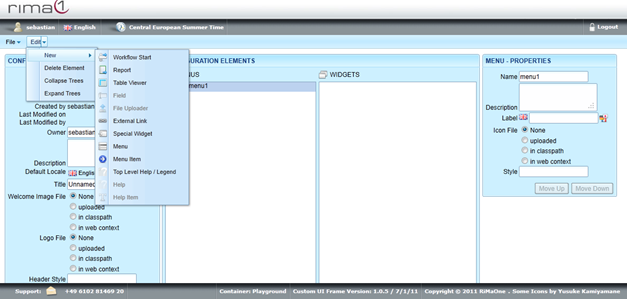
To create a menu item, click on the menu you want to create the menu item for. Open up the
Edit menu, select New and click on Menu Item.
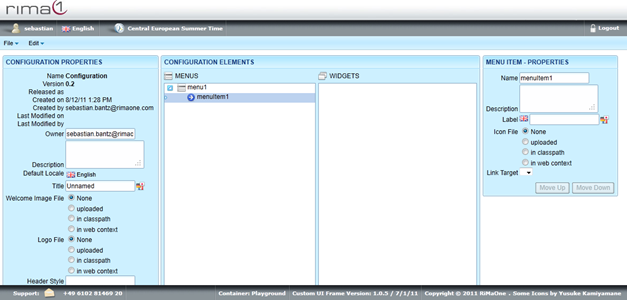
Click on the newly created Menu Item to edit Name, Description, Label, Icon File and Link.
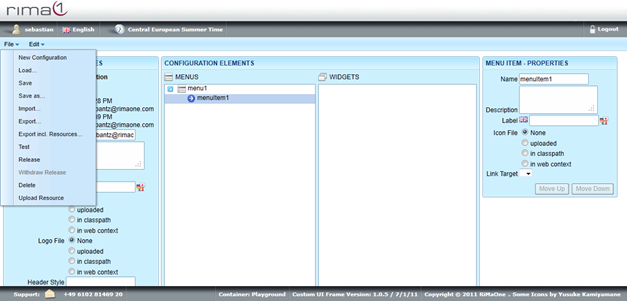
Remember to save all your changes in the File menu with Save.
Important:
Every Menu Item needs to be linked to a Widget which in turn needs to be linked to an Action
Point Template in TrackingOne. If this link chain is incomplete, the Menu Item or the Menu itself
will not appear in the custom ui.